
AI Squish Effect
1. Pick a style
2. Upload a photo
3. What do you want?
How to squish your photo
One photo in, one squish video out.
- 1
Upload a photo
A selfie, a couple or your pet. Choose Plush monster or Squishy toy.

- 2
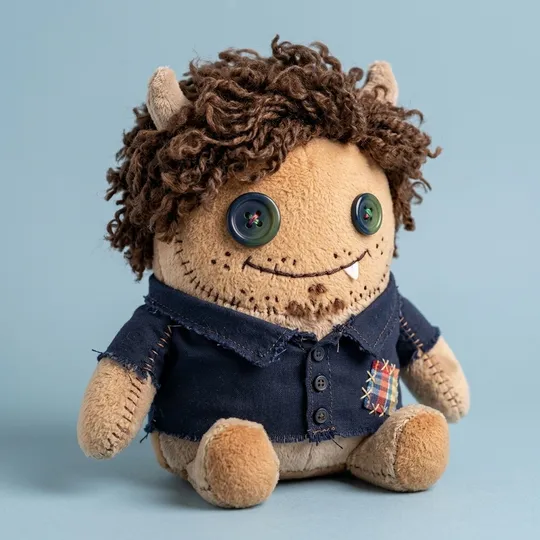
Get your toy
In about 30 seconds the photo becomes a toy you can download on its own.
- 3
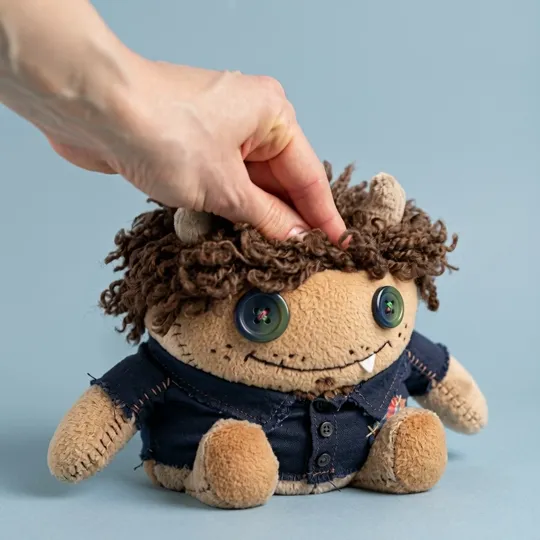
Watch it squish
A hand presses the toy flat and it slowly rises back. 5-second MP4 in 2 to 3 minutes.
How long does the squish effect take?
The toy picture takes about 30 seconds and the video about 2 to 3 minutes, so plan on roughly 3 minutes in total.
| Step | Time in our tests | Credits |
|---|---|---|
| Photo → plush or squishy toy | 23 to 48 seconds | 3 |
| Toy → 5-second squish video | about 2 min 20 s | 20 |
If you're signed in, you can leave the page while the video renders; it shows up in My Creations.
What makes the squish satisfying
Slow-rise rebound
The toy squashes flat, bulges at the sides and slowly puffs back, the way real squishies do.
It's still you
The toy keeps your hair, glasses and outfit colors, so friends know who just got squished.
Ready to post
A square 5-second MP4 that loops nicely on TikTok, Reels and Shorts.
Runs while you're away
Videos take 2 to 3 minutes. Close the tab; the video lands in My Creations.
Squish effect example
The toy picture, then the squish video made from it.
 Before
Why squish videos are everywhere
Slow-rising squishies and ugly-cute plush toys are a whole corner of TikTok: people squeeze a toy, it sinks, and then it creeps back up. The AI squish effect lets you do that to a toy version of yourself, your partner or your cat without buying anything.
Couples send them to each other, and pet owners squish their dog. Stress-relief accounts post a new one every day.
How much does the AI squish effect cost?
A full squish costs 23 credits: 3 for the toy picture and 20 for the video.
| Pack | Credits | Squish videos |
|---|---|---|
| Starter, $5.99 | 250 | 10 (with the toy pictures) |
New accounts start with 5 free credits, enough to make the toy picture and see how it looks before you buy a pack.
Tips for a better squish
Start from a clear photo with the face turned toward the camera; the clearer the toy, the cleaner the squish. Squishy toy is the softer, deeper squeeze. Plush monster gives a fluffier press and a puffier rebound.
Don't like the toy? Make another plush first. The video is only made from the picture you choose, so you never pay 20 credits for a toy you don't like.
AI squish effect FAQ
Upload a photo, pick Plush monster or Squishy toy, choose "Picture + 5s squish video" and click the button. You get the toy picture first and the squish video a couple of minutes later.
More tools
Go on, squish yourself.
3 credits for the toy, 20 for the video. New accounts get 5 free credits.